QR Code Generator
Type a link or text and the QR code updates as you type. Download it as PNG or SVG. The code holds your content itself, so it never expires.
Generated in your browser. Your text is not sent to a server. Sources: DENSO WAVE, ISO/IEC 18004 Updated
Version 2 (25 × 25 modules), level M, 19 of 26 bytes used.
How the QR code generator stores your text
- The text is turned into UTF-8 bytes. A header says "byte mode" and how many bytes follow.
- Error correction bytes are calculated from the data with a Reed–Solomon code and appended. They let a scanner rebuild parts of the code it cannot read.
- The smallest grid that holds everything is chosen. Grids are called versions: version 1 is 21 × 21 modules, and each version adds 4 modules per side up to version 40 with 177 × 177.
- The three corner squares, the timing lines and the alignment marks are drawn, and the bits are laid out in a zigzag from the bottom right corner.
- One of eight mask patterns is applied to break up large blank or dark areas, and the mask and error correction level are written next to the corner squares.
The bytes that count are UTF-8 bytes, not characters. The letter counter shows the byte count of any text, and text to binary shows the bits each byte puts into the code. A link with spaces or accented letters must be percent-encoded first; the URL encoder does that, and every escape costs three bytes.
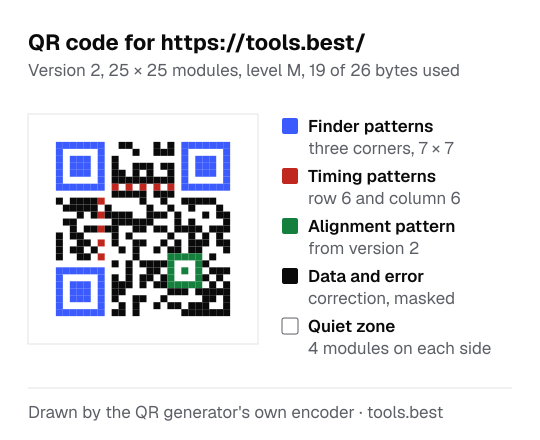
QR code size example: one link at four levels
The link https://tools.best/ is 19 characters, all basic Latin, so 19 bytes.
- At level L, version 1 holds 17 bytes, which is too few. The tool uses version 2 (25 × 25), which holds 32.
- At level M, version 1 holds 14 bytes, which is too few. The tool uses version 2 (25 × 25), which holds 26.
- At level Q, version 1 holds 11 bytes, which is too few. The tool uses version 2 (25 × 25), which holds 20.
- At level H, version 1 holds 7 bytes, which is too few. The tool uses version 3 (29 × 29), which holds 24.
A shorter link keeps the grid smaller, and a smaller grid can be printed smaller and still scan.
Each version adds 4 modules on every side, so version 2 is 25 × 25 and version 10 is 57 × 57. At the same printed width, more modules means smaller modules, and smaller modules are harder for a camera to tell apart.
QR code capacity by version and level
| Version | Modules | Level L | Level M | Level Q | Level H |
|---|---|---|---|---|---|
| 1 | 21 × 21 | 17 | 14 | 11 | 7 |
| 2 | 25 × 25 | 32 | 26 | 20 | 14 |
| 3 | 29 × 29 | 53 | 42 | 32 | 24 |
| 4 | 33 × 33 | 78 | 62 | 46 | 34 |
| 5 | 37 × 37 | 106 | 84 | 60 | 44 |
| 6 | 41 × 41 | 134 | 106 | 74 | 58 |
| 8 | 49 × 49 | 192 | 152 | 108 | 84 |
| 10 | 57 × 57 | 271 | 213 | 151 | 119 |
| 15 | 77 × 77 | 520 | 412 | 292 | 220 |
| 20 | 97 × 97 | 858 | 666 | 482 | 382 |
| 30 | 137 × 137 | 1732 | 1370 | 982 | 742 |
| 40 | 177 × 177 | 2953 | 2331 | 1663 | 1273 |
Bytes in byte mode, the mode this tool uses for all content. A letter outside basic Latin takes two or more bytes.
QR code error correction levels L, M, Q and H
| Level | Share of the code that can be restored | Use it for |
|---|---|---|
| L | about 7% | Long content on a clean screen |
| M | about 15% | Most uses |
| Q | about 25% | Print that may get worn |
| H | about 30% | Harsh conditions |
How to print a QR code that scans
- Keep the white margin. The standard asks for a quiet zone four modules wide on every side. The downloads include it.
- Dark on light. The downloads are black on white. If you recolor the code, keep the modules much darker than the background.
- Text encoding. Non-English text is stored as UTF-8. Current phone cameras read it correctly; some older scanner apps may show accented letters wrongly.
- Test before printing. Scan the final artwork at its real size.
A static code holds its content and nothing else. There is no redirect in between, so nobody can count your scans, and the code keeps working for as long as the link inside it does.
This address used to be called "dynamic QR code generator". The tool has always made static codes, and the page now says so. QR Code is a registered trademark of DENSO WAVE INCORPORATED.
QR Code Generator: FAQ
Do these QR codes expire?
What is the difference between a static and a dynamic QR code?
Can I change the link after printing the code?
Which error correction level should I choose?
PNG or SVG?
How much text fits in a QR code?
Why does my code not scan?
Sources
- DENSO WAVE: QR Code error correction feature — recovery capacity of levels L, M, Q and H
- DENSO WAVE: Information capacity and versions of QR Code
- ISO/IEC 18004:2015: QR Code bar code symbology specification — the encoding this tool implements