Text to Binary Converter
Type text to see it as 0s and 1s, eight bits for each byte. Switch direction to read binary back as text.
Runs in your browser. Your text is not sent to a server. Sources: RFC 20, RFC 3629 Updated
2 bytes, 16 bits
How text becomes binary
character → UTF-8 bytes → eight binary digits per byte
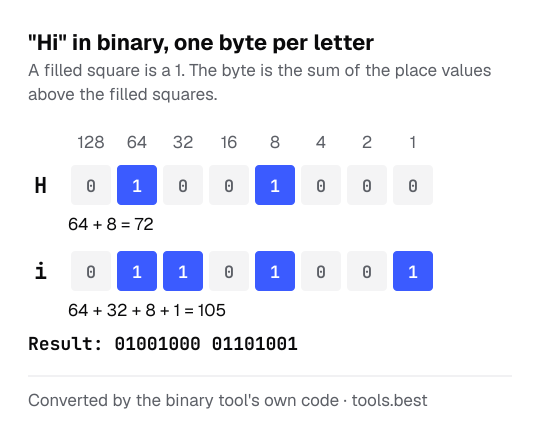
Binary is base 2. Each digit, or bit, is worth twice the one to its right: 128, 64, 32, 16, 8, 4, 2, 1. A byte is the sum of the place values where the bit is 1.
The character codes come from ASCII for basic Latin text and from UTF-8 for everything else. The ASCII to text converter shows the same codes as decimal numbers, and the full table of printable characters.
How to convert text to binary: a worked example
The text Hi:
- H has the code 72. 72 = 64 + 8, so the bits for 64 and 8 are set: 01001000
- i has the code 105. 105 = 64 + 32 + 8 + 1: 01101001
- Result: 01001000 01101001
Reading it back, 01001000 is 64 + 8 = 72, the letter H. To read binary, the tool needs whole bytes: the number of digits must divide by eight, and spaces between the groups are optional.
Binary is the longest way to write bytes. The same Hi is 48 69 in hexadecimal, two digits per byte, and SGk= in Base64, four characters for every three bytes.
Binary alphabet: A to Z in 8-bit code
| Letter | Binary | Letter | Binary |
|---|---|---|---|
| A | 01000001 | a | 01100001 |
| B | 01000010 | b | 01100010 |
| C | 01000011 | c | 01100011 |
| D | 01000100 | d | 01100100 |
| E | 01000101 | e | 01100101 |
| F | 01000110 | f | 01100110 |
| G | 01000111 | g | 01100111 |
| H | 01001000 | h | 01101000 |
| I | 01001001 | i | 01101001 |
| J | 01001010 | j | 01101010 |
| K | 01001011 | k | 01101011 |
| L | 01001100 | l | 01101100 |
| M | 01001101 | m | 01101101 |
| N | 01001110 | n | 01101110 |
| O | 01001111 | o | 01101111 |
| P | 01010000 | p | 01110000 |
| Q | 01010001 | q | 01110001 |
| R | 01010010 | r | 01110010 |
| S | 01010011 | s | 01110011 |
| T | 01010100 | t | 01110100 |
| U | 01010101 | u | 01110101 |
| V | 01010110 | v | 01110110 |
| W | 01010111 | w | 01110111 |
| X | 01011000 | x | 01111000 |
| Y | 01011001 | y | 01111001 |
| Z | 01011010 | z | 01111010 |
| space | 00100000 | 0 | 00110000 |
A capital and its small letter differ in one bit only, the one worth 32: A is 01000001 and a is 01100001. The letters to numbers converter ignores that difference: a and A are both 1 there.
Text to Binary Converter: FAQ
How do you write a letter in binary?
01000001.Why are there eight digits per letter?
How do I read binary back into text?
What happens with emoji or accented letters?
Is 01101000 01101001 the same in every program?
Sources
- RFC 20: ASCII format for Network Interchange — the character codes for basic Latin text
- RFC 3629: UTF-8, a transformation format of ISO 10646