URL Decoder and Encoder
This URL decoder and encoder turns a percent-encoded URL back into readable text, or makes text safe for a URL: %20 becomes a space, %26 becomes &.
Runs in your browser. Your text is not sent to a server. Sources: RFC 3986 Updated
How URL percent-encoding works
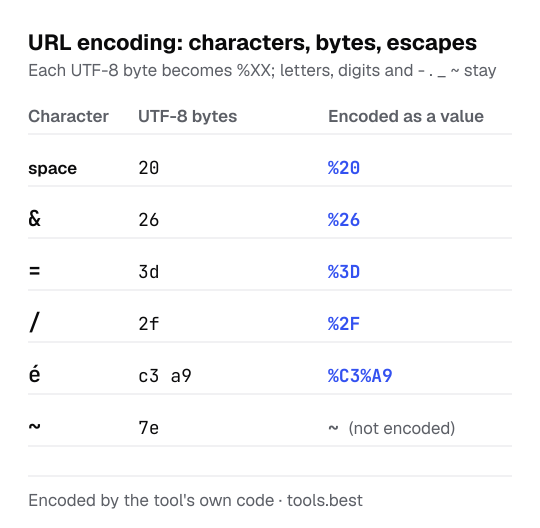
A URL may only contain a limited set of characters. Anything else, and any reserved character that should be read as plain text, is written as a percent sign followed by the two hexadecimal digits of each of its UTF-8 bytes.
character → UTF-8 bytes → %XX for each byte (space → byte 20 → %20)
Letters, digits and - . _ ~ are never encoded. Decoding is the reverse: every %XX becomes a byte and the bytes are read as UTF-8.
The two digits after each % are the byte in hexadecimal, the same notation the text to hex converter uses, and the byte values of the basic Latin characters are listed on the ASCII to text page. A string of letters, digits and + / = without percent signs is more likely Base64; the Base64 decoder reads it.
How to decode a URL: a worked example
Decoding https://example.com/search?q=hello%20world%26more&lang=de%2DCH:
%20is byte 20, a space: hello world%26is byte 26, an ampersand that belongs to the search term: hello world&more%2Dis byte 2D, a hyphen. It did not need encoding, but decoding it is harmless: de-CH- Result: https://example.com/search?q=hello world&more&lang=de-CH
In the other direction, the value hello world&more=é encodes to hello%20world%26more%3D%C3%A9. The é takes two escapes because it is two bytes in UTF-8. Encode a link this way before you put it into a QR code, and count the escapes: each one is three bytes the code has to hold.
URL encoding table: reserved characters and codes
| Character | Code | Escaped as a value | Escaped in a whole URL |
|---|---|---|---|
| space | %20 | yes | yes |
! | %21 | no | no |
" | %22 | yes | yes |
# | %23 | yes | no |
$ | %24 | yes | no |
% | %25 | yes | yes |
& | %26 | yes | no |
' | %27 | no | no |
( | %28 | no | no |
) | %29 | no | no |
* | %2A | no | no |
+ | %2B | yes | no |
, | %2C | yes | no |
/ | %2F | yes | no |
: | %3A | yes | no |
; | %3B | yes | no |
< | %3C | yes | yes |
= | %3D | yes | no |
> | %3E | yes | yes |
? | %3F | yes | no |
@ | %40 | yes | no |
[ | %5B | yes | yes |
] | %5D | yes | yes |
The two right-hand columns show what the Encode button does, which is what JavaScript's encodeURIComponent and encodeURI do. Both leave ! ' ( ) * alone; these are valid in a URL and rarely cause trouble, but some APIs want them escaped as well.
URL Decoder and Encoder: FAQ
What does %20 mean in a URL?
hello%20world decodes to hello world.What is %3D in a URL?
=, so a%3Db decodes to a=b. In a query string a plain = separates a name from its value, so an = that belongs inside a value, such as the padding at the end of a Base64 string, is written as %3D. The URL encoding table on this page lists the code of every reserved character.Why does a + sometimes mean a space?
+ in the query string, a convention older than the URL standard. In the rest of a URL a plus is just a plus. Tick Read + as a space when you decode form data or a search query.When should I encode a value and when a whole URL?
/, ?, & and =, is escaped. Encode a whole URL when you already have a complete address that contains spaces or non-English letters: its structure is kept.Why do I get an error when decoding?
100% or %zz is not valid encoding, and the tool tells you where the problem is. You also get an error when the bytes do not form valid UTF-8, for example %E9 on its own.Why is the result different after decoding and encoding again?
& was a separator and which was %26 inside a value. Encoding the decoded text as a value escapes all of them. Encode values one at a time, before you join them into a URL.How are letters like é or 日 encoded?
%C3%A9; 日 is three and becomes %E6%97%A5.Sources
- RFC 3986: Uniform Resource Identifier (URI): Generic Syntax, section 2 — percent-encoding, reserved and unreserved characters
- WHATWG URL Standard: application/x-www-form-urlencoded — the + for a space in form data
- ECMAScript Language Specification: encodeURIComponent and decodeURIComponent — the functions this tool calls