Encoding Tools
Base64, URL encoding, hex, binary and character codes, in both directions.
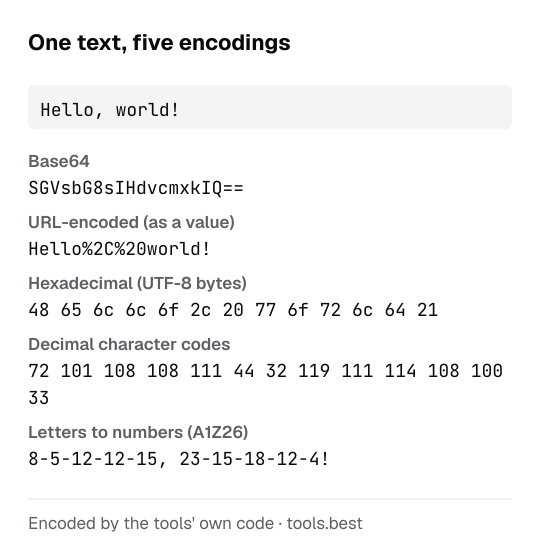
An encoding is a different way of writing the same data. Nothing is hidden and nothing is lost: anyone can reverse it. That makes these tools useful for reading and preparing data, and useless for keeping a secret.
Pick the tool by the notation you have in front of you:
- Letters, digits,
+,/and=at the end, such asSGVsbG8=: Base64. - Percent signs followed by two characters, such as
hello%20world: URL encoding. - Pairs of the characters 0–9 and a–f, such as
48 65 6c 6c 6f: hexadecimal. - Groups of eight zeros and ones: binary.
- Decimal numbers such as
72 101 108 108 111: ASCII character codes. - Numbers from 1 to 26: the letters to numbers code, A=1 to Z=26.
Every tool works in both directions. Choose the direction above the editor, or press Swap to send the result back through the other way.
Text is always treated as UTF-8, the encoding of the web, so accented letters, non-Latin scripts and emoji are handled correctly and show up as two to four bytes each. When the input cannot be decoded, the tool says what is wrong and where, instead of printing garbage.
All of it runs in your browser from one small engine that is covered by unit tests, including the test vectors of RFC 4648 for Base64. The text you paste is not sent to a server. For Base64 that contains a picture, use Base64 to image; for a fingerprint of a text, the hash generator.
All encoding tools
- ASCII to Text ConverterCharacter codes to text and back, with the ASCII table.
- Base64 Decoder and EncoderDecode Base64 to text or encode text to Base64.
- Letters to Numbers ConverterA=1, B=2 … Z=26, in both directions.
- Text to Binary ConverterText to 8-bit binary and binary back to text.
- Text to Hex ConverterText to hexadecimal bytes and hex back to text.
- URL Decoder and EncoderDecode %20 and friends, or percent-encode text for a URL.
Sources
- RFC 4648: The Base16, Base32, and Base64 Data Encodings (checked October 16, 2026)
- RFC 3986: Uniform Resource Identifier (URI): Generic Syntax — percent-encoding (checked October 16, 2026)