Text Tools
Fix, count and reorder text. Paste it in, copy the result out.
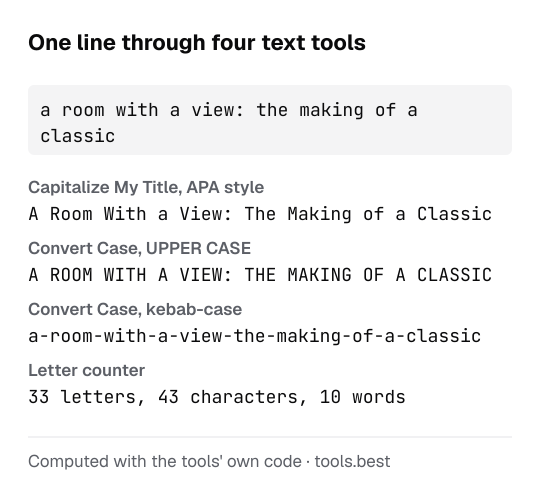
These tools change the form of a text without changing what it says. Convert Case switches between upper case, lower case, sentence case and the naming styles programmers use, and it is the quickest fix for a paragraph typed with Caps Lock on. Capitalize My Title does one thing more carefully: it applies the title-case rules of APA, AP, Chicago or MLA style and shows which short words each guide leaves in lower case.
The letter counter is also the word and character counter. It reports letters, characters with and without spaces, words, sentences, paragraphs, lines and bytes, plus how often each letter occurs. If you need the time a text takes to read or speak, pass its word count to the words to minutes calculator.
The alphabetical order generator sorts lines A to Z, Z to A or by length and removes duplicates. The Unicode text converter replaces letters with bold, italic, script or other look-alike characters from the Unicode Standard for places that do not allow formatting.
Most of these tools share the same two-pane editor: your text on the left, the result on the right, and buttons to copy, download, swap and clear. The result is recalculated on every keystroke.
Everything happens in your browser, so the text you paste is not sent to a server and nothing is stored after you close the page. Each page lists the exact rule it applies and a worked example, so you can check a result by hand.
All text tools
- Alphabetical Order GeneratorSort lines A to Z, Z to A or by length; drop duplicates.
- Capitalize My TitleTitle case by APA, AP, Chicago or MLA rules.
- Convert CaseUpper, lower, title, sentence, camelCase, snake_case and more.
- Letter CounterLetters, characters, words, sentences and letter frequency.
- Unicode Text ConverterBold, italic, script, monospace, circled and more, as plain characters.
- Words to Minutes CalculatorReading and speaking time for a word count, at speeds you set.
Sources
- The Unicode Standard: Mathematical Alphanumeric Symbols (U+1D400–U+1D7FF) — the styled letters of the Unicode text converter (checked October 16, 2026)