ASCII Art Generator
This ASCII art generator turns a word or a short line into large letters made of characters, ready to copy into a README, a code comment or a plain-text message.
Runs in your browser. Nothing you enter is sent to a server. Sources: Unicode charts Updated
█     █  ███████  █        █         █████
█     █  █        █        █        █     █
███████  █████    █        █        █     █
█     █  █        █        █        █     █
█     █  ███████  ███████  ███████   █████
5 lines, 43 characters wide.
How the ASCII art generator draws letters
There is no font engine behind this. For each style the page holds a small table that says how every supported character is drawn, row by row.
The tool looks up each character you type, places the shapes side by side and joins the rows. Each line of your text becomes its own row of large letters, with an empty line between them.
The block and double-line alphabets have capital letters only, so your text is converted to capitals first. Spaces at the end of each output line are removed, which keeps the art clean when you paste it into a file.
For bold or script letters that stay the size of normal text, use the Unicode text converter instead. To change the case of text that goes into a frame, run it through Convert Case first.
ASCII art styles: block, box drawing, frame and circled
| Style | Characters it draws | Height | Made of |
|---|---|---|---|
| Block letters (█) | A to Z, 0 to 9, space and . , ! ? - : ' / + = _ | 5 lines | The full block character U+2588, from the Unicode Block Elements |
| Block letters, plain ASCII (#) | The same set | 5 lines | The # sign and spaces: ASCII only |
| Double-line letters | A to Z and space | 3 lines | Unicode Box Drawing characters such as ╔ ═ ╣ |
| Frame, double line | Anything you type | Your lines plus 2 | Your text inside a border of Box Drawing characters |
| Frame, plain ASCII | Anything you type | Your lines plus 2 | Your text inside a border of +, - and | |
| Circled letters | A to Z, a to z and 0 to 9 are replaced; other characters stay as typed | Your lines | Unicode Enclosed Alphanumerics such as Ⓐ ⓑ ① |
A character that a style cannot draw is left as a blank space, and the line under the result names it. Accented letters such as é have no shape in the block and double-line styles.
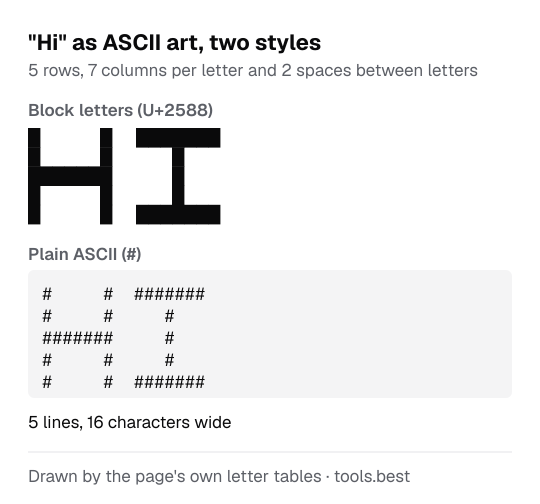
ASCII art example: "Hi" in block letters
Type Hi and choose "Block letters, plain ASCII (#)". Each letter is 7 characters wide with 2 spaces between letters, so the result is 5 lines and 16 characters wide:
#     #  #######
#     #     #
#######     #
#     #     #
#     #  #######
The same text in "Frame, plain ASCII" keeps the lowercase letter and is 3 lines tall:
+----+
| Hi |
+----+
Is block-letter text really ASCII?
ASCII has 95 printable characters: the space, the digits, the unaccented Latin letters and common punctuation, at codes 32 to 126. The full list is in the table on the ASCII to text page.
The block character █, the box drawing lines and the circled letters are not among them. They are Unicode characters.
This matters when the destination only accepts ASCII, for example some source code style rules or old terminals. In that case use one of the two "plain ASCII" styles.
The frame styles count one column per character. Characters that are drawn two columns wide in a monospaced font, such as Chinese, Japanese and Korean characters and most emoji, will push the right border out of line.
ASCII Art Generator: FAQ
Why does the art look broken after I paste it?
Is the output really ASCII?
Which characters can I type?
Can it turn a picture into ASCII art?
Why are lowercase letters shown as capitals?
Sources
- The Unicode Standard: C0 Controls and Basic Latin (ASCII), U+0000 to U+007F (checked October 12, 2026)
- The Unicode Standard: Block Elements, U+2580 to U+259F (checked October 12, 2026)
- The Unicode Standard: Box Drawing, U+2500 to U+257F (checked October 12, 2026)
- The Unicode Standard: Enclosed Alphanumerics, U+2460 to U+24FF (checked October 12, 2026)