Schema Markup Generator
Pick a type, fill in the form and copy schema.org markup as a JSON-LD script block for a local business, product, article, event or FAQ page.
Runs in your browser. Nothing you enter is sent to a server. Sources: Schema.org, Google Search Central Updated
Schema.org is a shared vocabulary for describing things on a web page: a business, a product, an article, an event. JSON-LD is one way to write it, as a block of JSON inside a <script type="application/ld+json"> tag, separate from the visible text.
Google recommends JSON-LD among the formats it supports. This tool writes that block for five common types.
Required properties for each schema type
| Type | This tool asks for at least | What Google's documentation says |
|---|---|---|
| LocalBusiness | Name, street address, city | Requires name and address, and asks for as many address parts as possible. Recommends telephone, url and opening hours among others. |
| Product | Name, price, currency | Requires name and one of review, aggregateRating or offers. Inside an offer, price is required; currency and availability are recommended. |
| Article | Headline | No required properties. Recommends author, datePublished, dateModified, headline and image. |
| Event | Name, start date, street address, city | Requires name, startDate, location and location.address. Events with no physical location are not supported. |
| FAQPage | One question with its answer | The FAQ rich result is no longer shown: it stopped appearing on 7 May 2026 and its documentation was removed in June 2026. |
The middle column is this tool's own rule for when it will write the block. The right column summarizes Google's pages listed under Sources, as read on 12 October 2026.
Google changes these requirements from time to time, so check the linked page for the type you use.
Product schema markup example
Choose "Product". Enter the name Wireless Mouse, the price 29.99, the currency USD, set availability to "In stock" and press "Generate markup". The result is:
<script type="application/ld+json">
{
  "@context": "https://schema.org",
  "@type": "Product",
  "name": "Wireless Mouse",
  "offers": {
    "@type": "Offer",
    "price": "29.99",
    "priceCurrency": "USD",
    "availability": "https://schema.org/InStock"
  }
}
</script>
You typed three flat values, but price, currency and availability do not belong to the product itself. In schema.org they describe an offer to sell it, so the tool puts them inside an offers object of type Offer.
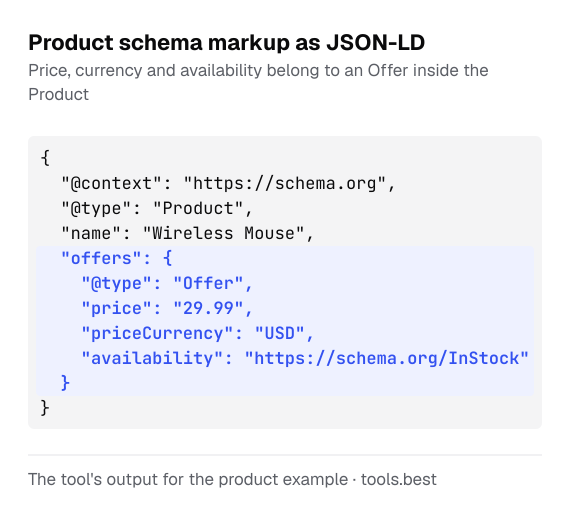
How the schema markup generator nests your answers
- Address fields of a business go into
address, an object of typePostalAddress. For an event the same object sits insidelocation, an object of typePlacethat also holds the venue name. - Brand becomes an object of type
Brandwith aname. - Author becomes a
Personor anOrganization, whichever you select, with anameand, if you give one, aurl. Publisher becomes anOrganization. - Questions and answers become a
mainEntitylist ofQuestionobjects, each with anacceptedAnswerof typeAnswer. - Opening hours use the schema.org
openingHourstext format: two-letter days (Mo, Tu, We, Th, Fr, Sa, Su) and 24-hour times, for exampleMo-Fr 09:00-17:00. Two or more entries separated by semicolons are written as a list. Google's local business page describes a different property,openingHoursSpecification, which this tool does not write. - Empty optional fields are left out of the output. An event end time without an end date is taken to be on the start date.
- A
<in your text is written as<. That is the same character in JSON, and it stops text such as</script>inside an answer from ending the block early.
Event dates and time zones
A start date alone is written as 2026-11-20. With a start time it becomes 2026-11-20T19:30:00, and with a UTC offset 2026-11-20T19:30:00+01:00. The tool writes the time you type and does not convert it to another time zone.
Enter the local time at the venue. Google's event documentation says that when no offset is given it uses the time zone of the event's location, and that you should leave the time out if it is not known yet.
How to test schema markup before you publish
The tool checks that the fields it needs are filled in, that URLs are complete, that the price is a number and the currency code has three letters. It cannot check that what you typed is true. Google's guidelines ask that the markup matches what visitors see on the page.
After pasting the block, test the page with Google's Rich Results Test, which reports the Google features a page is eligible for, or with the Schema Markup Validator, which checks any schema.org markup.
A few tools help with the values themselves. Capitalize My Title sets the capitals of an article headline, the letter counter checks the length of a description, and the URL encoder escapes spaces and accented letters in a link before it goes into a url field.
Schema Markup Generator: FAQ
Where do I put the generated code?
Will this markup give my page a rich result in Google?
Is FAQ markup still worth adding?
Why is the price written in quotes?
Can I use a more specific business type than LocalBusiness?
@type in the output by hand, and check the name against the list on schema.org.Sources
- Schema.org — the vocabulary: types and property names (checked October 12, 2026)
- Schema.org: openingHours — format of opening hours text (checked October 12, 2026)
- Google Search Central: Introduction to structured data markup — JSON-LD placement and testing (checked October 12, 2026)
- Google Search Central: General structured data guidelines — no guarantee of display; visible content only (checked October 12, 2026)
- Google Search Central: Local business structured data (checked October 12, 2026)
- Google Search Central: Product snippet structured data (checked October 12, 2026)
- Google Search Central: Article structured data (checked October 12, 2026)
- Google Search Central: Event structured data (checked October 12, 2026)
- Google Search Central: Latest documentation updates — entries of May and June 2026 on the removal of the FAQ rich result (checked October 12, 2026)