What Is My IP Address
Press the button to see the public IP address that websites see when you connect, and what it reveals about your location and provider.
Pressing the button sends a request to ipapi.co, or to api.ipify.org if that fails. Both see your IP address. Sources: RFC 1918 Updated
Your public IP address
Not looked up yet
Nothing has been requested yet. Pressing the button asks ipapi.co for your address, approximate location and provider. If that fails, api.ipify.org is asked for the address only.
What happens when you look up your IP address
A web page cannot read your public IP address by itself: the browser does not expose it. The page has to ask a server on the internet, "which address did this request come from?"
- Your browser sends one request to
https://ipapi.co/json/. The request contains no data from this page; your IP address is simply where it comes from. - ipapi.co answers with the address and what its database associates with it: city, region, country, time zone, coordinates and the network that owns the address.
- If that request fails, the page asks
https://api.ipify.orginstead, which returns the address and nothing else. - The answer is shown on this page. It is not stored and not sent to tools.best.
The coordinates are shown as text with a link to OpenStreetMap. No map is loaded into the page, so no map provider is contacted unless you follow the link. The privacy page lists this lookup with the few other tools on the site that contact an outside service.
Public and private IP addresses
The address above is your public address. Inside your own network, each device has a private address that is not reachable from the internet. Private IPv4 addresses come from three reserved blocks:
| Block | Addresses | Typical use |
|---|---|---|
10.0.0.0/8 | 10.0.0.0 to 10.255.255.255 | Large networks, some home routers |
172.16.0.0/12 | 172.16.0.0 to 172.31.255.255 | Company networks |
192.168.0.0/16 | 192.168.0.0 to 192.168.255.255 | Most home routers |
If an address starts with one of these, it is a private address. In IPv6 the equivalent block is fc00::/7.
How to find your router's address
The router's address inside your network is listed on your device as the default gateway:
- Windows: open Command Prompt and run
ipconfig. Look for "Default Gateway". - macOS: System Settings, Network, select the connection, Details, TCP/IP: "Router". In Terminal:
route -n get default. - Linux: run
ip routeand read the address after "default via". - iPhone and Android: open the Wi-Fi settings, tap the connected network and look for "Router" or "Gateway".
Typing that address into the browser's address bar opens the router's settings page.
IPv4 and IPv6 addresses compared
An IPv4 address is four numbers from 0 to 255 separated by dots, such as 203.0.113.42, an address that RFC 5737 reserves for examples. Each number is one byte, eight bits, which text to binary shows for any character.
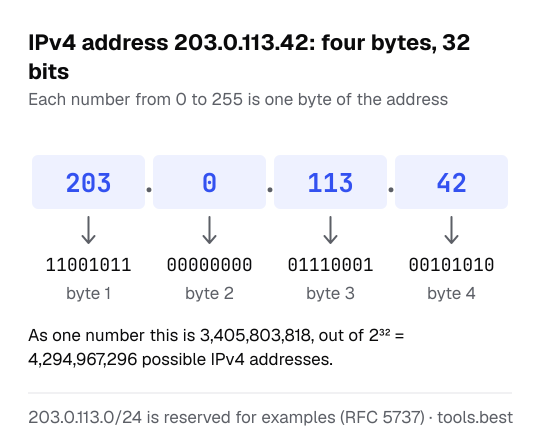
An IPv6 address is eight groups of hexadecimal digits separated by colons, such as 2001:db8::8a2e:370:7334; hex is the base-16 notation of the text to hex converter. Many connections have both. The lookup shows whichever one your browser used to reach the service.
What Is My IP Address: FAQ
What is a public IP address?
How accurate is the location?
Why is the address different from the one my computer shows?
What is my router's IP address?
Does my IP address change?
Why did the lookup fail?
Sources
- RFC 1918: Address Allocation for Private Internets — the private address ranges
- RFC 4193: Unique Local IPv6 Unicast Addresses
- ipapi.co: IP address lookup service — the service that answers the lookup
- ipify: public IP address API — the fallback service
- RFC 5737: IPv4 Address Blocks Reserved for Documentation — 203.0.113.0/24, used for the example address (checked October 16, 2026)