Base64 Decoder and Encoder
This Base64 decoder and encoder reads Base64 as text, or switches to Encode to turn text into Base64. It works with UTF-8 and with the URL-safe alphabet.
Runs in your browser. Your text is not sent to a server. Sources: RFC 4648 Updated
13 bytes out
How Base64 encoding works: 3 bytes, 4 characters
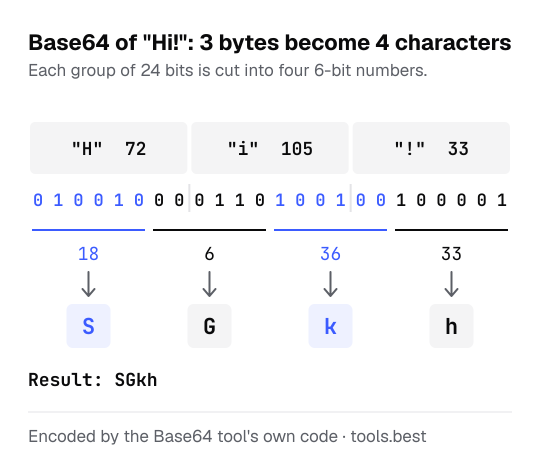
Base64 takes the bytes three at a time. Three bytes are 24 bits, which are cut into four groups of 6 bits. Each group is a number from 0 to 63 and is written as one character from this alphabet:
0–25: A–Z 26–51: a–z 52–61: 0–9 62: + 63: /
Text is turned into UTF-8 bytes first; the text to hex converter shows those bytes for any text. Decoding reverses the steps and then reads the bytes as UTF-8.
How to encode text to Base64 by hand
Encoding Hi!:
- The bytes are 72, 105 and 33. In binary, as text to binary writes them: 01001000 01101001 00100001
- Regrouped into sixes: 010010 000110 100100 100001
- As numbers: 18, 6, 36, 33. In the alphabet these are S, G, k and h.
- Result: SGkh
When the input does not divide by three, the last group is padded: Hi encodes to SGk= and H to SA==.
Base64 examples: text, JSON, accents and emoji
| Text | Base64 | URL-safe |
|---|---|---|
Hello, World! | SGVsbG8sIFdvcmxkIQ== | SGVsbG8sIFdvcmxkIQ |
user:password | dXNlcjpwYXNzd29yZA== | dXNlcjpwYXNzd29yZA |
{"alg":"HS256"} | eyJhbGciOiJIUzI1NiJ9 | eyJhbGciOiJIUzI1NiJ9 |
café | Y2Fmw6k= | Y2Fmw6k |
a>b?c | YT5iP2M= | YT5iP2M |
😀 | 8J+YgA== | 8J-YgA |
What the Base64 decoder accepts
- The standard alphabet and the URL-safe alphabet, also mixed.
- Missing padding, and line breaks or spaces inside the data.
- A
data:…;base64,prefix, which is ignored.
It reports the first character that is not part of Base64, and a length that cannot be right (a single leftover character can never be decoded).
If the decoded bytes are a picture, the Base64 to image converter shows it and saves it as a file. Text full of percent signs, such as hello%20world, is URL encoding, not Base64: read it with the URL decoder.
Base64 Decoder and Encoder: FAQ
What is Base64 used for?
Is Base64 encryption?
What are the = signs at the end?
= fill the last group. The decoder on this page also accepts Base64 with the padding left off.What is URL-safe Base64?
+ with - and / with _, and usually drops the padding, so the result can sit in a URL or file name without escaping. The decoder accepts both alphabets.Why does decoding say the bytes are not UTF-8 text?
How much bigger does Base64 make my data?
Sources
- RFC 4648: The Base16, Base32, and Base64 Data Encodings — section 4 (Base64) and section 5 (URL-safe alphabet)
- RFC 3629: UTF-8, a transformation format of ISO 10646