ZIP Converter
Packs the files you choose into one ZIP archive with DEFLATE compression, built in your browser without uploading anything.
Runs in your browser. Your files are not uploaded. Sources: PKWARE ZIP specification, RFC 1951 Updated
No files chosen yet.
| File | Size | In the archive | Method |
|---|
What the ZIP converter does
It packs the files you choose into one ZIP archive and gives you the archive as a download. Everything happens in your browser: the files are read from your device, the archive is built in memory, and the download comes from memory. Nothing is sent to a server.
It creates archives only. It does not open, extract or repair ZIP files, and it does not convert a ZIP into another format.
ZIP compression: DEFLATE or stored
With Compress the files ticked, each file is compressed with DEFLATE, the method almost every ZIP tool uses, through the browser's built-in CompressionStream. The tool then compares the two sizes:
- If the compressed data is smaller, it goes into the archive. The table shows the method as DEFLATE.
- If it is not smaller, the file goes in unchanged. The table shows the method as Stored.
With the box unticked every file is stored unchanged. The same happens in a browser that has no CompressionStream support for raw DEFLATE; the tool tells you when that is the case.
How much a file shrinks depends on what is in it:
| Kind of file | What to expect |
|---|---|
| Plain text, CSV, JSON, HTML, XML, SVG, source code | Usually much smaller |
| Uncompressed images and audio such as BMP and WAV | Smaller, by an amount that depends on the content |
| JPEG, PNG, GIF, MP3, MP4, PDF, DOCX, XLSX, other ZIP files | Little or no change, because they are already compressed |
What is inside a ZIP file
The archive follows the published ZIP specification. For each file it holds:
- a local file header, followed by the file's data;
- an entry in the central directory at the end of the archive, which is the index that unzip tools read first;
- a CRC-32 checksum of the original data, so an unzip tool can detect a damaged file (a short fingerprint, like the hashes of the hash generator, but built only to catch accidental damage);
- the original and compressed sizes, and the file's last-modified time;
- the file name in UTF-8, flagged as such, so accents and non-Latin scripts survive.
The archive ends with the end of central directory record. There is no encryption, no password and no archive comment.
We checked archives made by this code with three independent programs: Info-ZIP's unzip, ditto on macOS, and Python's zipfile module. All three returned every file byte for byte, including files with accented, Japanese and emoji names. We have not tested every unzip program.
How big is a ZIP file? A worked example
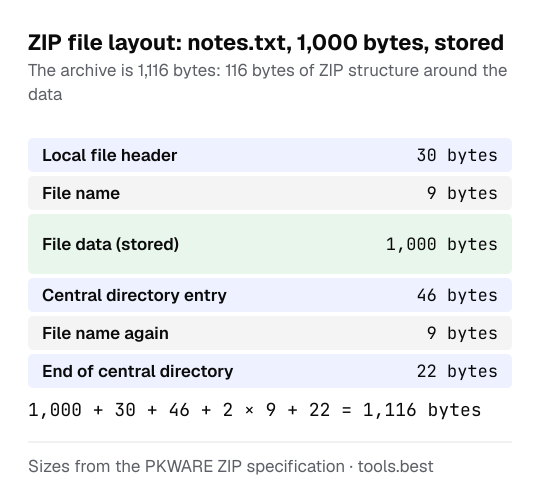
For each file the ZIP format adds a 30-byte local header and a 46-byte directory entry, each followed by the file name, and the archive ends with a 22-byte record.
archive size = data + files × 76 + 2 × (bytes in all file names) + 22
Take one file of 1,000 bytes called notes.txt, stored without compression. The name is 9 bytes long, so the archive is 1,000 + 76 + 18 + 22 = 1,116 bytes. With compression on, the 1,000 bytes of data are replaced by however many bytes DEFLATE needs for that file.
An image that is already compressed, such as a PNG from the QR code generator, is usually stored unchanged, so its archive is that file plus the headers. More file and format tools are under everyday tools.
ZIP converter limits: 4 GB and 65,534 files
- Size. The tool writes the standard format without the ZIP64 extension. Each file and the finished archive must stay under 4 GB (4,294,967,295 bytes), and one archive can hold up to 65,534 files. It stops with a message if you go over.
- Memory. The archive is built in memory, so very large files can be too much for a phone or an older computer. If that happens the tool reports that the archive could not be created.
- Folders. Folders cannot be chosen, and all files sit at the top level of the archive. If two chosen files have the same name, the second is renamed, for example
report (2).pdf. - Dates. ZIP stores the last-modified time in local time, in two-second steps, and cannot store a date before 1980.
ZIP Converter: FAQ
Are my files uploaded?
Why is the ZIP not smaller than my file?
Is there a size limit?
Can it open a ZIP or convert a ZIP to another format?
Can I protect the ZIP with a password?
Sources
- PKWARE APPNOTE.TXT, .ZIP File Format Specification, version 6.3.10 (checked October 12, 2026)
- RFC 1951: DEFLATE Compressed Data Format Specification version 1.3 (checked October 12, 2026)
- WHATWG Compression Standard (CompressionStream and the deflate-raw format) (checked October 12, 2026)