LaTeX Table Generator
Fill in the grid and copy the LaTeX code for the table: a tabular environment inside a table float, with special characters escaped for you.
Runs in your browser. Nothing you enter is sent to a server. Sources: LaTeX2e reference Updated
Table contents
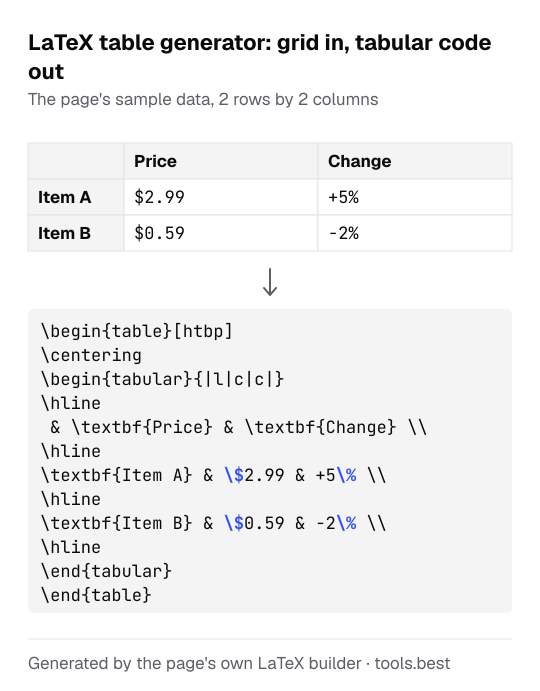
LaTeX table example: the code for a 2 × 2 table
Set rows to 2 and columns to 2, leave the other options as they are, and press "Fill sample data". The grid now has the headers Price and Change, the row labels Item A and Item B, and four cells. The code is:
\begin{table}[htbp]
\centering
\begin{tabular}{|l|c|c|}
\hline
 & \textbf{Price} & \textbf{Change} \\
\hline
\textbf{Item A} & \$2.99 & +5\% \\
\hline
\textbf{Item B} & \$0.59 & -2\% \\
\hline
\end{tabular}
\end{table}
Reading it from the top:
{|l|c|c|}describes the columns. The firstlis the column of row labels, which is always left-aligned. Each data column gets the letter you chose:lfor left,cfor centered,rfor right. A|draws a vertical line.&separates two cells and\\ends a row.\hlinedraws a horizontal line under the row before it.- The dollar and percent signs were typed as
$2.99and+5%. The tool wrote\$and\%so that LaTeX prints them.
With a caption "Prices in May" and a label "tab:prices", two more lines appear before the last one: \caption{Prices in May} and \label{tab:prices}.
To put the rows in order before you type them, use the alphabetical order generator. For a table of a logic expression, the truth table generator builds every row for you, and Capitalize My Title sets the capitals of a caption in APA or Chicago style.
Special characters LaTeX tables need escaped
LaTeX reserves ten characters for its own use. Typed into a cell as they are, they would cause an error or disappear.
The tool replaces them in every cell, header, row label and caption. It does the same for three more characters that print as other symbols in OT1, the font encoding LaTeX uses by default: there a typed < comes out as ¡, > as ¿ and | as a long dash.
| You type | The code contains |
|---|---|
& | \& |
% | \% |
$ | \$ |
# | \# |
_ | \_ |
{ and } | \{ and \} |
\ | \textbackslash{} |
~ | \textasciitilde{} |
^ | \textasciicircum{} |
<, > and | | \textless{}, \textgreater{} and \textbar{} |
One more case is handled. If the first cell of a row starts with [ or *, LaTeX would read it as an option of the \\ that ends the row above. The tool puts {} in front of such a row.
The label is not printed, so it is not escaped: spaces become hyphens, and anything other than letters, digits, colon, dot, hyphen and underscore is removed.
LaTeX table borders: the three line styles
| Option | Column description | Where \hline goes |
|---|---|---|
| Around every cell | {|l|c|c|} | Above the first row and under every row |
| Top, under the header, bottom | {lcc} | Above the first row, under the header row, under the last row |
| None | {lcc} | Nowhere |
The second style has no vertical lines. If you switch the header row off, it draws only the top and bottom lines.
What the LaTeX table generator does not do
- No merged cells:
\multicolumnand\multirowhave to be added by hand. - No column widths. A cell with a long sentence stays on one line and can run past the page edge. For wrapped text change the column letter to something like
p{4cm}in the code. - No preview. The grid shows the contents, and only compiling the code shows the final spacing and fonts.
LaTeX Table Generator: FAQ
Do I need a package to compile the code?
table and tabular environments, \hline, \textbf, \caption and \label. Paste it into the body of any document, between \begin{document} and \end{document}.Why does my table not appear where I put it?
table is a float, so LaTeX chooses the position. The code asks for [htbp]: here if it fits, otherwise the top of a page, the bottom of a page, or a page of floats. To force the exact spot, load the float package and change the option to [H].Can I type LaTeX commands or math into a cell?
$x^2$ in a cell, add it to the code by hand after copying.How do I refer to the table in my text?
tab:results, then write Table~\ref{tab:results} in your text. The tool puts \label after \caption, and it leaves the label out when there is no caption, because the label takes its number from the caption.Is there a size limit?
longtable, which this tool does not write.Sources
- LaTeX2e unofficial reference manual: tabular — column letters l, c, r, the vertical bar, &, \\ and \hline (checked October 12, 2026)
- LaTeX2e unofficial reference manual: table (checked October 12, 2026)
- LaTeX2e unofficial reference manual: Floats — the placement letters h, t, b, p and H (checked October 12, 2026)
- LaTeX2e unofficial reference manual: \label — labels go after captions; the tab: prefix convention (checked October 12, 2026)
- LaTeX2e unofficial reference manual: Special characters — the reserved characters (checked October 12, 2026)
- LaTeX2e unofficial reference manual: Text symbols — \textbackslash, \textasciitilde, \textasciicircum, \textless, \textgreater, \textbar (checked October 12, 2026)
- LaTeX2e unofficial reference manual: fontenc package — OT1 is the default font encoding (checked October 12, 2026)
- Wikipedia: OT1 encoding — character table showing what the codes of <, > and | print as (checked October 12, 2026)
- The TeX FAQ: Start of line goes awry — why a row that starts with [ or * needs protecting (checked October 12, 2026)